
Guest viewing limit reached
- You have reached the maximum number of guest views allowed
- Please register below to remove this limitation
- Already a member? Click here to login
You are using an out of date browser. It may not display this or other websites correctly.
You should upgrade or use an alternative browser.
You should upgrade or use an alternative browser.
Byse Discussion
-
 Thread starter
Byse
Thread starter
Byse
- Start date
- 1,556 Replies
- 263,917 Views


1,556 comments
kamikaze1997
Active Member
Hello, my remote uploads start but give an error.If you have allowed embed domain set in settings and your mobile device is hiding referer this is exact reason why you see that message.
I tried with more than 500 files and they give an error.
Please respond to my request, I want to buy bandwidth at the new price.
Post automatically merged:
I've already figured out my problem.If you have allowed embed domain set in settings and your mobile device is hiding referer this is exact reason why you see that message.
Not enough disk space on your account.
So the limit is 40TB of files? I'd like more, is that possible?
--------
I also want to buy more bands with the new price.
Last edited:

Hello!
I would like to kindly ask if you could check the ticket I submitted from the account “Mitaku.” It is to renew my annual Premium subscription.
I have no issue if the renewal comes with a price adjustment, according to the current policy.
I’ve noticed that the response is taking longer than usual for ticket support, which is why I’m following up, and I appreciate your attention in advance.
I would like to kindly ask if you could check the ticket I submitted from the account “Mitaku.” It is to renew my annual Premium subscription.
I have no issue if the renewal comes with a price adjustment, according to the current policy.
I’ve noticed that the response is taking longer than usual for ticket support, which is why I’m following up, and I appreciate your attention in advance.
kamikaze1997
Active Member
I'm in the same situation. I believe they no longer offer a premium plan because even the support tickets are being closed. They take 3 days to close the ticket.Hello!
I would like to kindly ask if you could check the ticket I submitted from the account “Mitaku.” It is to renew my annual Premium subscription.
I have no issue if the renewal comes with a price adjustment, according to the current policy.
I’ve noticed that the response is taking longer than usual for ticket support, which is why I’m following up, and I appreciate your attention in advance.
Another thing, I need more storage space.
The host is very good, but the support is awful.
Sang nguyen
Active Member
It seems he has no intention of selling premium accounts anymore. Premium users paid a very small amount and they used up all the server resources, which caused 100,000 free users to wait a long time for encryption. I don't intend to complain, and I apologize if I wrote anything incorrectly.
BulletXerno
Active Member
anyone got paid here?

still no,hope will be soonanyone got paid here?
I paid and didn't get premium xDHello! Just a quick update , I was able to renew my Premium successfully.
Thanks a lot for your help and for fixing the issue, I really appreciate it!
@Byse
I think something is broken or there is just a problem with purchasing premium for USDT TRON

Something similar happens.This service used to be highly respectable and worked perfectly, but after the name, structure, and everything else were changed, free users are now stuck with very long encoding wait times.
It’s been stuck since yesterday and hasn’t moved at all.
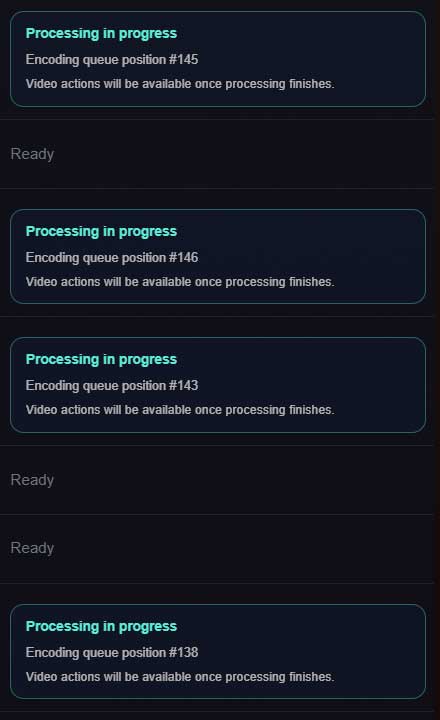
I haven't been able to post new content for quite some time.
Hello,
We have prepared major update of our platform, please see the changes listed below, updates will be pushed to our production servers every day as there is quite amount of them and we'd like to ensure everything is working properly before pushing each of the change.
1. We have prepared inactive files manager, now on you will see all inactive files for past 90 days and you can reclaim the space by deleting these files. Our system will automatically removed all dead files that have not received a view for past 180 days. Before files are removed you will receive notification and email.
2. We have restored purchasing, from now on you can extend your premium automatically.
3. We have limited disk space for every FREE user to 20TB. After reaching 20TB either you should reclaim the space or upgrade your storage. Storage can be upgraded in two ways:
Free users can claim their storage based on their traffic as previously at filemoon.
Premium Bandwidth users will now not have any storage you should purchase any storage amount you need at 4$ per 1TB storage monthly.
4. We have corrected CSV export to correctly export links via HTTPS instead of HTTP.
5. We have removed multi quality for free users and reverted quality logic to premium users only, this functionality will be auto enabled once you purchase premium account.
6. We have implemented folder sharing feature where you can share all files within the folder, we have extended this functionality so you can now share your folder as a whole by sharing it that way viewers will be able to see folders inside the folders and all files within these folders by navigating trough them.
7. We have moved our FTP server into new machine, now FTP uploads should be more stable without FTP server crashing.
8. We have integrated automatic payout request on NET+7 terms. Now our system will automatically request payout for every user whos balance exceeded minimum payout amount. All payments will be processed on NET+7 Terms. Manual payout requests will be disabled.
POINTS 1,2,5 ARE ALREADY LIVE, POINTS 3,4,6 ARE PLANNED TO BE RELEASED ON 22.03, REMAINING POINTS PLANNED RELEASE DATE IS 24.03. REST OF THE CHANGES WILL BE LISTED ONCE THIS LIST IS LIVE AT PRODUCTION.
We have prepared major update of our platform, please see the changes listed below, updates will be pushed to our production servers every day as there is quite amount of them and we'd like to ensure everything is working properly before pushing each of the change.
1. We have prepared inactive files manager, now on you will see all inactive files for past 90 days and you can reclaim the space by deleting these files. Our system will automatically removed all dead files that have not received a view for past 180 days. Before files are removed you will receive notification and email.
2. We have restored purchasing, from now on you can extend your premium automatically.
3. We have limited disk space for every FREE user to 20TB. After reaching 20TB either you should reclaim the space or upgrade your storage. Storage can be upgraded in two ways:
Free users can claim their storage based on their traffic as previously at filemoon.
Premium Bandwidth users will now not have any storage you should purchase any storage amount you need at 4$ per 1TB storage monthly.
4. We have corrected CSV export to correctly export links via HTTPS instead of HTTP.
5. We have removed multi quality for free users and reverted quality logic to premium users only, this functionality will be auto enabled once you purchase premium account.
6. We have implemented folder sharing feature where you can share all files within the folder, we have extended this functionality so you can now share your folder as a whole by sharing it that way viewers will be able to see folders inside the folders and all files within these folders by navigating trough them.
7. We have moved our FTP server into new machine, now FTP uploads should be more stable without FTP server crashing.
8. We have integrated automatic payout request on NET+7 terms. Now our system will automatically request payout for every user whos balance exceeded minimum payout amount. All payments will be processed on NET+7 Terms. Manual payout requests will be disabled.
POINTS 1,2,5 ARE ALREADY LIVE, POINTS 3,4,6 ARE PLANNED TO BE RELEASED ON 22.03, REMAINING POINTS PLANNED RELEASE DATE IS 24.03. REST OF THE CHANGES WILL BE LISTED ONCE THIS LIST IS LIVE AT PRODUCTION.

@Byse, thanks for enabling the inactive file list. i can now work on getting those videos some more views. its a great feature
any chance you can give us a bit more time to get our inactive files active again so they are not deleted
Post automatically merged:
any chance you can give us a bit more time to get our inactive files active again so they are not deleted
Last edited:
Hello,
We have prepared major update of our platform, please see the changes listed below, updates will be pushed to our production servers every day as there is quite amount of them and we'd like to ensure everything is working properly before pushing each of the change.
1. We have prepared inactive files manager, now on you will see all inactive files for past 90 days and you can reclaim the space by deleting these files. Our system will automatically removed all dead files that have not received a view for past 180 days. Before files are removed you will receive notification and email.
2. We have restored purchasing, from now on you can extend your premium automatically.
3. We have limited disk space for every FREE user to 20TB. After reaching 20TB either you should reclaim the space or upgrade your storage. Storage can be upgraded in two ways:
Free users can claim their storage based on their traffic as previously at filemoon.
Premium Bandwidth users will now not have any storage you should purchase any storage amount you need at 4$ per 1TB storage monthly.
4. We have corrected CSV export to correctly export links via HTTPS instead of HTTP.
5. We have removed multi quality for free users and reverted quality logic to premium users only, this functionality will be auto enabled once you purchase premium account.
6. We have implemented folder sharing feature where you can share all files within the folder, we have extended this functionality so you can now share your folder as a whole by sharing it that way viewers will be able to see folders inside the folders and all files within these folders by navigating trough them.
7. We have moved our FTP server into new machine, now FTP uploads should be more stable without FTP server crashing.
8. We have integrated automatic payout request on NET+7 terms. Now our system will automatically request payout for every user whos balance exceeded minimum payout amount. All payments will be processed on NET+7 Terms. Manual payout requests will be disabled.
POINTS 1,2,5 ARE ALREADY LIVE, POINTS 3,4,6 ARE PLANNED TO BE RELEASED ON 22.03, REMAINING POINTS PLANNED RELEASE DATE IS 24.03. REST OF THE CHANGES WILL BE LISTED ONCE THIS LIST IS LIVE AT PRODUCTION.
I thought point 1 was going to be optional and not mandatory.
The most useful feature would be the ability to paste a list of links to delete.
I can export links and detect which ones were left out. I'm also currently redesigning the site, so there might be some links that have been inactive for months that were going to be reinstated, and others that were seen yesterday and were just removed.
And I could have only the active links or those that are about to be activated.
thanks point 4.
Does point 8 refer to being able to configure, for example, to automatically request a payment every time I reach, for example, $80?
Post automatically merged:
A small bug that's been around for a while.
In the file manager, both when you go to the main folder and when you search for a specific file, it always shows all the files that are being converted or are in the queue.
And when you browse folders or search, this makes managing files quite difficult.
Last edited:
Dear administrator, another thing that could be improved is the ability to create new folders again. I haven't been able to create folders for weeks; the only solution I've found is to create subfolders, which I can do, but I can't create new main folders.
I just noticed the following error: if I have a file in the ROOT directory and I want to move it to a subfolder, it doesn't allow me to. When the window appears to select the desired folder, it only allows me to move it to main folders; subfolders don't appear in that window.
Post automatically merged:
I just noticed the following error: if I have a file in the ROOT directory and I want to move it to a subfolder, it doesn't allow me to. When the window appears to select the desired folder, it only allows me to move it to main folders; subfolders don't appear in that window.
Last edited:
I was able to create main folders in Firefox a few days ago, and I recently moved files without problems, and I need to move more files soon.Dear administrator, another thing that could be improved is the ability to create new folders again. I haven't been able to create folders for weeks; the only solution I've found is to create subfolders, which I can do, but I can't create new main folders.
Post automatically merged:
I just noticed the following error: if I have a file in the ROOT directory and I want to move it to a subfolder, it doesn't allow me to. When the window appears to select the desired folder, it only allows me to move it to main folders; subfolders don't appear in that window.
It's nice to see something being done.
Paid the premium. The transaction went through successfully but I received nothing from the premium.
Should I contact you personally or will you activate it after some time?
Update. It just activated!
Post automatically merged:
Paid the premium. The transaction went through successfully but I received nothing from the premium.
Should I contact you personally or will you activate it after some time?
Post automatically merged:
Update. It just activated!
Last edited:
kamikaze1997
Active Member
Hi, I didn't understand one point.
There's the Premium Plan and the Premium Bandwidth Plan.
Is the data limit valid for both premium plans? Or only the premium plan?
There's the Premium Plan and the Premium Bandwidth Plan.
Is the data limit valid for both premium plans? Or only the premium plan?
About the author
Trending
-
ERapidgator Discussion thread37,749 Replies Thread
-
uploaded.net - PPD (30 EUR) & PPS (60% inital sale /50% rebill)31,213 Replies Thread

-
I
 FileSonic.com – $17PPS, $35/1000 Downloads – Make Your Life Easier - Go with FS!31,142 Replies Thread
 -
 KatFile – Earn up to $100 PPD + 50% Sales/Rebills9,933 Replies Thread
 -
PWupload.com19,670 Replies Thread
Advertise on WJunction
Reach 1000's of webmasters, hosts & affiliates. Banner & sponsored-thread slots available.
Contact us