Skip to content
WJunction - Webmaster Forum

Show/Hide div

Status
Not open for further replies.
Hello,
i working on school project. So i need to create table for stuff. Also when you click on the name or
Xof8h.png
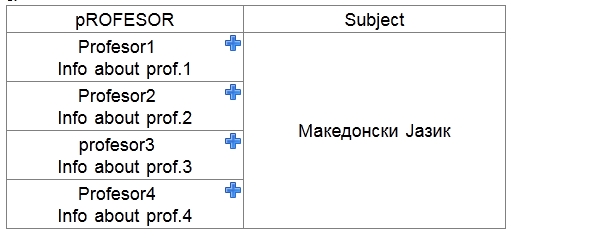
need to show additional div for info about prof.
here is table
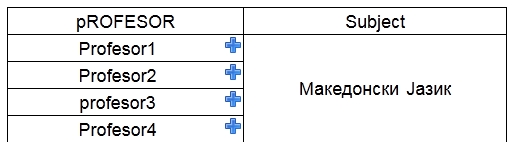
46tJw.jpg

when you click on Profesor4 info will show in profesor1
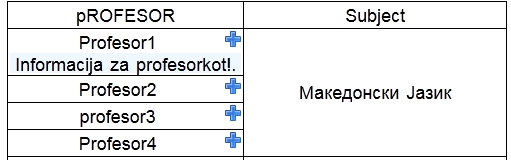
LDxSN.jpg

is need to show info in clicked profesor4 no profesor 1 here is code, css and javascript

Code:
<!DOCTYPE html>
<html>
    <head>
        <meta http-equiv="Content-Type" content="text/html; charset=UTF-8">
        
        <script language="JavaScript">
            function toggle(id) {
                var state = document.getElementById(id).style.display;
                if (state == 'block') {
                    document.getElementById(id).style.display = 'none';
                } else {
                    document.getElementById(id).style.display = 'block';
                }
            }
        </script>


        <style>

            .tbody{
                border-collapse: collapse;
                width: 500px;
                word-spacing: 2px;
                /**position:  center; */
                font-family:  sans-serif;
                font-size: 18px;
                text-align: center;
            }
            .td{
                border-style:  double;
                border-width: 1px;
                padding: 2px 2px 2px 2px ;

            }
            
            .subject{
                border-width: 1px;
                border-style: double;
            }


            #main{
                width:500px;
                height: 20px;
                background: lightblue;
            }
            #hidden {
                width: auto;
                height:20px;
                background: aliceblue;
                display: none;
            }
            #img{
                /**padding-left: 10px;
                
                padding-right: 5px;
                padding-left: 5px;
                **/
                float: right;
            }
        </style>

        <title>Probna tabela</title>
    </head>
    <body>
        <table class="tbody" >
            <tbody>
                <tr>
                    <td class="td">pROFESOR</td>
                    <td class="td">Subject</td>
                </tr>

                <tr>
                    <td class="td">Profesor1<a href="#" onclick="toggle('hidden');"><img id="img" src="http://127.0.0.1/kadar/plus.png"/></a>
                        <div id="hidden">Info about prof.1</div></td>
                    <td class="subject" rowspan="4">Македонски Јазик</td>
                </tr>
                <tr><td class="td">Profesor2<a href="#" onclick="toggle('hidden');"><img id="img" src="http://127.0.0.1/kadar/plus.png"/></a>
                        <div id="hidden">Info about prof.2</div></td></tr>
                <tr><td class="td">profesor3<a href="#" onclick="toggle('hidden');"><img id="img" src="http://127.0.0.1/kadar/plus.png"/></a>
                        <div id="hidden">Info about prof.3</div></td></tr>
                <tr><td class="td">Profesor4<a href="#" onclick="toggle('hidden');"><img id="img" src="http://127.0.0.1/kadar/plus.png"/></a>
                        <div id="hidden">Info about prof.4</div>
                    </td></tr>
</table>

 

9 comments

in toggle('hidden') function you must set the id. The id must be unique on the page, you have the id "hidden" for all divs.
Try this:
Code:
<!DOCTYPE html>
<html>
    <head>
        <meta http-equiv="Content-Type" content="text/html; charset=UTF-8">
        
        <script language="JavaScript">
            function toggle(id) {
                var state = document.getElementById(id).style.display;
                if (state == 'block') {
                    document.getElementById(id).style.display = 'none';
                } else {
                    document.getElementById(id).style.display = 'block';
                }
            }
        </script>


        <style>

            .tbody{
                border-collapse: collapse;
                width: 500px;
                word-spacing: 2px;
                /**position:  center; */
                font-family:  sans-serif;
                font-size: 18px;
                text-align: center;
            }
            .td{
                border-style:  double;
                border-width: 1px;
                padding: 2px 2px 2px 2px ;

            }
            
            .subject{
                border-width: 1px;
                border-style: double;
            }


            #main{
                width:500px;
                height: 20px;
                background: lightblue;
            }
            #hidden {
                width: auto;
                height:20px;
                background: aliceblue;
                display: none;
            }
            #img{
                /**padding-left: 10px;
                
                padding-right: 5px;
                padding-left: 5px;
                **/
                float: right;
            }
        </style>

        <title>Probna tabela</title>
    </head>
    <body>
        <table class="tbody" >
            <tbody>
                <tr>
                    <td class="td">pROFESOR</td>
                    <td class="td">Subject</td>
                </tr>

                <tr>
                    <td class="td">Profesor1<a href="#" onclick="toggle('hidden1');"><img id="img" src="http://127.0.0.1/kadar/plus.png"/></a>
                        <div id="hidden1">Info about prof.1</div></td>
                    <td class="subject" rowspan="4">Македонски Јазик</td>
                </tr>
                <tr><td class="td">Profesor2<a href="#" onclick="toggle('hidden2');"><img id="img" src="http://127.0.0.1/kadar/plus.png"/></a>
                        <div id="hidden2">Info about prof.2</div></td></tr>
                <tr><td class="td">profesor3<a href="#" onclick="toggle('hidden3');"><img id="img" src="http://127.0.0.1/kadar/plus.png"/></a>
                        <div id="hidden3">Info about prof.3</div></td></tr>
                <tr><td class="td">Profesor4<a href="#" onclick="toggle('hidden4');"><img id="img" src="http://127.0.0.1/kadar/plus.png"/></a>
                        <div id="hidden4">Info about prof.4</div>
                    </td></tr>
</table>
 
okay now thanks very much. But the info is displayed immediately, I want to show info when clicked the professor or the image
aYdqz.jpg


or how can i do this on click to show info like this? Can you give some ex. code for this
CM3l9.jpg

this is web
Code:
http://nova.edu.mk/EN/learning_at_nova/high_school/faculty_and_staff.aspx
 
Last edited:
I try this to view code of page but i don't have success. I don't understand JavaScript also try on local host but nothing. If anyone know how to do this i will pay for that :)
 
This dialog is for showing info about one thing. I need for more then 20 person info to show in different dialog box on click.
ex.

If i click on Professor 1 to show info about Professor1
if i click on Professor 2 to show info about Professor2.....
is something like this on picture

you can see i click on Anglea and i can view info about Anglea if i click on Aleksandar i can see info about him :)
CM3l9.jpg

Thanks to all who helped me and want to help<3
 
Just right click the page. Save page as and then open it as a new site in Dreamweaver or your preferred code editing software and work the code down until all you are left with is the JS files and the code for the popout.

Thanks, VPSVolt.
 
Status
Not open for further replies.

About the author

N
Active Member · Joined
173
Messages
23
Reactions
18
Points

Advertise on WJunction

Reach 1000's of webmasters, hosts & affiliates. Banner & sponsored-thread slots available.

Contact us
Back
Top Bottom