
Guest viewing limit reached
- You have reached the maximum number of guest views allowed
- Please register below to remove this limitation
- Already a member? Click here to login
You are using an out of date browser. It may not display this or other websites correctly.
You should upgrade or use an alternative browser.
You should upgrade or use an alternative browser.

- Status
- Not open for further replies.
27 comments
I found out that "virt-top" is the right way. :D
Nice to know it worked out for you ^_^

you should install win virtio drivers, it will improve I/O and network performance by an 500%.Is there a way to improve the horrible I/O read on windows and such?
Like it lags like a mofo.
http://alt.fedoraproject.org/pub/alt/virtio-win/latest/images/bin/
Edit KVM guest config file and add:
<disk type='file' device='cdrom'>
<source file='/home/kvm/iso/virtio-win-0.1-59.iso'/>
<target dev='hdc'/>
<readonly/>
</disk>
Load the "storage" drivers from windows installer. For net virtio driver, uninstall default network card, reboot the machine and load net drivers "XP" from mounted iso, reboot, configure network.
If you have problems contact me I am sys admin I know, linux, solusvm, kvm, xen, whm/cpanel, sql, apache, db, etc

the above guide is for clean installs, but if you have windows already installed then the following guide is for you (dont forget to mount the iso on KVM guest XML file):
http://kahdev.wordpress.com/2011/05/30/using-virtio-drivers-in-a-kvm-windows-guest-vm/
http://kahdev.wordpress.com/2011/05/30/using-virtio-drivers-in-a-kvm-windows-guest-vm/
For
How would i do this automatically when creating first time windows vps on solusvm?
And I used http://docs.solusvm.com/kvm_guest_drivers
not sure if its the same...
<disk type='file' device='cdrom'>
<source file='/home/kvm/iso/virtio-win-0.1-59.iso'/>
<target dev='hdc'/>
<readonly/>
</disk>
How would i do this automatically when creating first time windows vps on solusvm?
And I used http://docs.solusvm.com/kvm_guest_drivers
not sure if its the same...
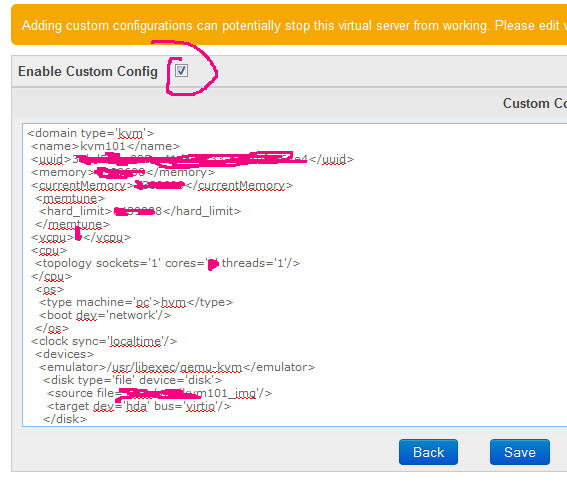
you should add it in <device></device> tags e.g.:
<device>
<disk type='file' device='cdrom'>
<source file='/home/kvm/iso/virtio-win-0.1-59.iso'/>
<target dev='hdc'/>
<readonly/>
</disk>
Other Devices Listed Here.....
</device>
---------- Post added at 08:39 AM ---------- Previous post was at 08:34 AM ----------
<device>
<disk type='file' device='cdrom'>
<source file='/home/kvm/iso/virtio-win-0.1-59.iso'/>
<target dev='hdc'/>
<readonly/>
</disk>
Other Devices Listed Here.....
</device>
---------- Post added at 08:39 AM ---------- Previous post was at 08:34 AM ----------
it's so hard to copy & paste the KVM guest config on Solus Master then add the new cdrom device?oh okay. Thank you.
And for the auto doing it on first time creation I can't seem to find any guide for it on
http://docs.solusvm.com/v2/Default.htm#Developer/Admin-Api/Admin-Api.htm
Like this?
Code:
<domain type='kvm'>
 <name>kvm432</name>
 <uuid>8a425580-e741-4614-b84d-d4e2cd444064</uuid>
 <memory>6668288</memory>
 <currentMemory>6668288</currentMemory>
  <memtune>
   <hard_limit>6719488</hard_limit>
  </memtune>
 <vcpu>1</vcpu>
 <cpu>
  <topology sockets='1' cores='1' threads='1'/>
 </cpu>
  <os>
   <type machine='pc'>hvm</type>
   <boot dev='cdrom'/>
   <boot dev='hd'/>
  </os>
 <clock sync='localtime'/>
  <devices>
   <emulator>/usr/libexec/qemu-kvm</emulator>
    <disk type='file' device='disk'>
     <source file='/dev/vg/kvm432_img'/>
     <target dev='hda' bus='ide'/>
     <driver cache='writethrough'/>
    </disk>
<disk type='file' device='cdrom'>
<source file='/home/solusvm/kvm/driver/Windows-Virtio-Drivers-v0.1.30.iso'/>
<target dev='hdc'/>
<readonly/>
</disk>
    <interface type='bridge'>
     <model type='e1000' />
     <source bridge='br0'/>
     <target dev='kvm432.0'/>
     <mac address='02:00:00:2c:ae:8b'/>
    </interface>
    <graphics type='vnc' port='6033' passwd='password' listen='0.0.0.0'/>
    <input type='tablet'/>
    <input type='mouse'/>
    </devices>
    <features>
    <acpi/>
    <apic/>
    </features>
    </domain>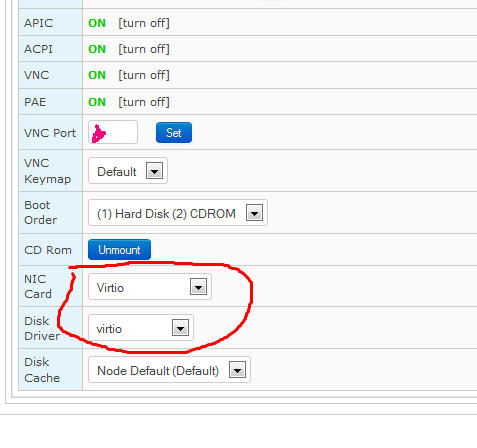
- Status
- Not open for further replies.
Trending
-
DRapidgator Discussion thread37,733 Replies Thread
-
uploaded.net - PPD (30 EUR) & PPS (60% inital sale /50% rebill)31,213 Replies Thread

-
S
 KatFile – Earn up to $100 PPD + 50% Sales/Rebills9,880 Replies Thread
 -
 Keep2Share.cc - Trouble free file sharing! Wowzers! It’s super easy!12,035 Replies Thread
 -
I
 FileSonic.com – $17PPS, $35/1000 Downloads – Make Your Life Easier - Go with FS!31,142 Replies Thread
Advertise on WJunction
Reach 1000's of webmasters, hosts & affiliates. Banner & sponsored-thread slots available.
Contact us