Skip to content
WJunction - Webmaster Forum

I need help to transfer my files in my RDP to my PC

Status
Not open for further replies.
I need help to transfer my download files in my RDP to my PC

RDP -----> to my PC.

I tried using file server in my RDP but my FILEZILLA on my pc cant connect to my RDP. =(

but I tried my laptop using file server then transfer it to pc its working .

hope you can help me with this kind of issue thank you.
 

8 comments

U can use mediafire.com. In mediafire u can upload upto 200MB filesize. So u can splite it useing win rar....
In mediafire U can get resume able link.....

otherwise U contact me.
 
Last edited:
Use any ftp client in your pc....create a account in your rdp and create a folder and share with created acc
open your pc fz and connect with rdp's ip,,,,,,,,when rdp will connect choose created folder......where u can upload your file....or you can download file from rdp
 
Last edited:
Better option
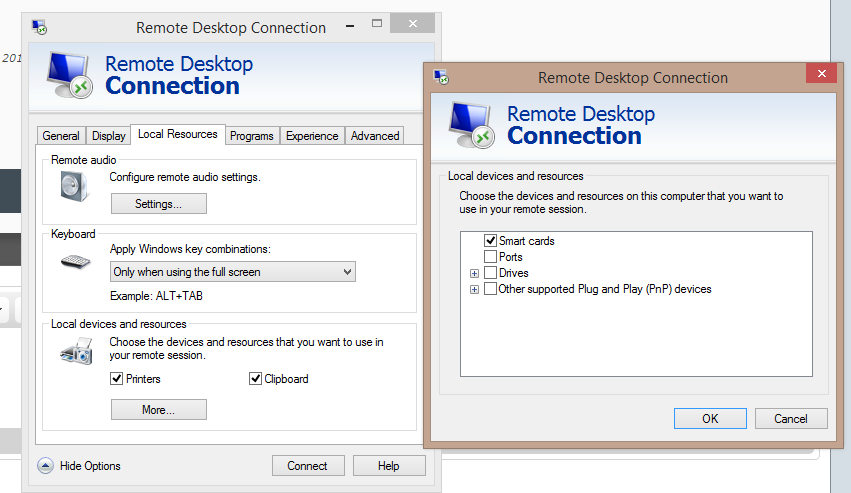
Remote Desktop connection > Local Resources >
More..
>>>>
Select Drives.

Now in your RDP your drives (C and D will be shown)simply you can copy and paste into it

0uqUHMP.png
 
try copy paste, thats what i usually do. if your on a good connection it shouldnt be a problem.

if not, try teamviewer as somebody mentioned previously or last resort mega or another file uploading service.
 
Status
Not open for further replies.

About the author

K
Active Member · Joined
999
Messages
270
Reactions
63
Points

Advertise on WJunction

Reach 1000's of webmasters, hosts & affiliates. Banner & sponsored-thread slots available.

Contact us
Back
Top Bottom