

Hello guys,
Can someone please give me a little help here?
So I need to show a image in my category description, I already did that but only appears the text and not the html image code.
Screenshot:

This is my code:
I checked Twenty Eleven theme code and inserted this code:
And works great!! But the problem is that I have duplicated descriptions now and I dont know what to do to solve it.
Screenshot:
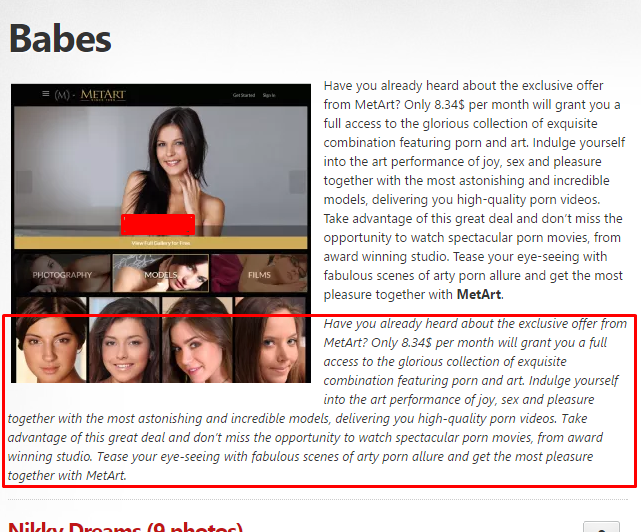
My code with the change:
What I am doing wrong?
Can someone help me with this?
I already tried to remove:
But it gives me an error...
Full code:
Paste2.org - Viewing Paste pX8m1KKM
Hope someone can help me, thanks!
Can someone please give me a little help here?
So I need to show a image in my category description, I already did that but only appears the text and not the html image code.
Screenshot:
This is my code:
PHP:
<?php if(is_category()): ?>
            <h1 class="title archive-category"><?php atom()->term->Title(); ?></h1>

            <?php if(atom()->term->getDescription()): ?>
            <div class="large">


              <p><em><?php atom()->term->Description(); ?></em></p>

            </div>
            <div class="divider"></div>
            <?php endif; ?>

            <?php elseif(is_tag()): ?>
I checked Twenty Eleven theme code and inserted this code:
PHP:
<?php
$category_description = category_description();
if ( ! empty( $category_description ) ) {
echo apply_filters( 'category_archive_meta', '<div class="category-archive-meta">' . $category_description . '</div>' );
}
?>
And works great!! But the problem is that I have duplicated descriptions now and I dont know what to do to solve it.
Screenshot:
My code with the change:
PHP:
<?php if(is_category()): ?>
            <h1 class="title archive-category"><?php atom()->term->Title(); ?></h1>

            <?php if(atom()->term->getDescription()): ?>
            <div class="large">
<?php
$category_description = category_description();
if ( ! empty( $category_description ) ) {
echo apply_filters( 'category_archive_meta', '<div class="category-archive-meta">' . $category_description . '</div>' );
}
?>
              <p><em><?php atom()->term->Description(); ?></em></p>

            </div>
            <div class="divider"></div>
            <?php endif; ?>

            <?php elseif(is_tag()): ?>
What I am doing wrong?
Can someone help me with this?
I already tried to remove:
PHP:
<p><em><?php atom()->term->Description(); ?></em></p>But it gives me an error...
Full code:
Paste2.org - Viewing Paste pX8m1KKM
Hope someone can help me, thanks!


