


Emilascovici
Active Member
Hello,:fly: I wanted to write this article to help some of uploaders which need a guide to start. When i start i didn't have infos how to start and was a little bit hard to find all infos needed. So i will start here, when you want to start you must to have a powerful computer+ internet speed very fast or buy a rdp ( i have purchased). What do you need is a software for encoding/ converting, a tracker which you download the content and a site to upload.I will talk in this article about all what you need to be a uploader and what these softwares are.
1. The converting software
- I have tried to use meGui and other sofwares but these are to complex for me, you should to know the basics for codecs to know how to work with it and use it. And now I'm working with Gom converter and works very well for me, a license for this costs 42$ ( the VAT is included), it's easy to use, it's converting very fast, converts the quality really good and doesn't incrase the video size to much. You can select to convert videos in queue and you can choice from 1 by 1 up to 4 one time, but it's enough and 1 by 1, if you have a rdp it's fast, a hd tv series it's made in 20-30 minutes max. You can add sutitles on video and logo too.
The formats
You can choice between avi,mp4, wmv, flv, ogm, bgm, mp3. I have tested the converting and for the best quality and file size are mp4 and avi, i make all video in to mp4 because they have very good quality and don't use much space.
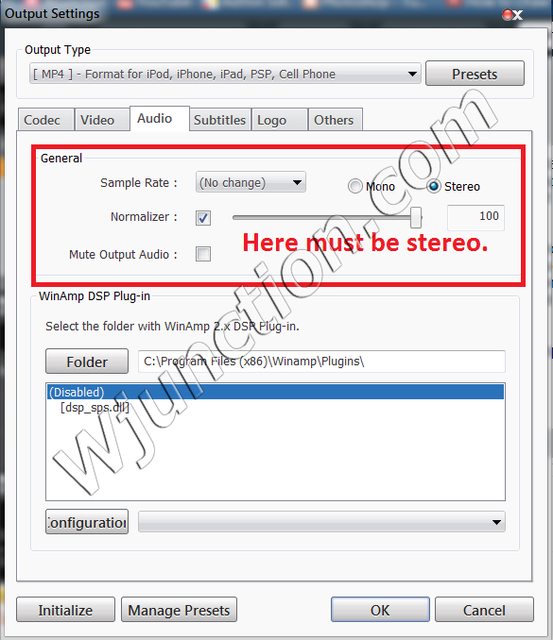
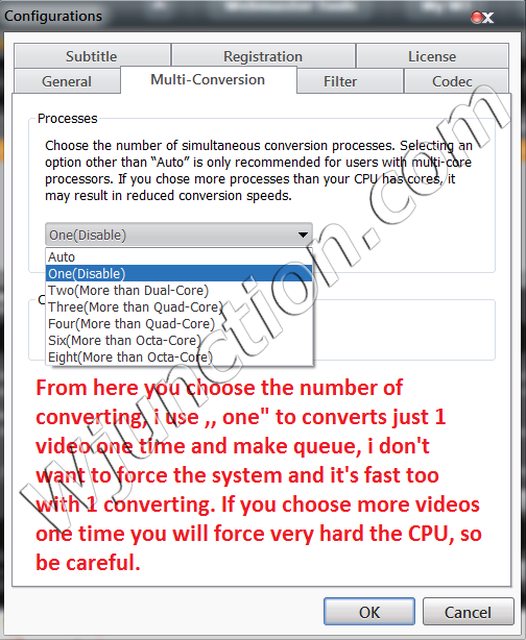
I will put some photos and there you'll see how to make the settings.




2. RDP
RDP it's a meaning of ,, remote desktop protocol" and exactly this is a mini server, controlled by remote, it's like your own pc. This costs about 30$ per month and do you have 1gbps speed and very powerful server, about 200gb space( enough) and security. I have purchased from dedirdp, good price, good support and trusted. And with this powerful server you can convert very fast 1 video so doesn't worth to choose more videos one time, it's enough one by one.
3. Where can i upload?
I recommend you videomega.tv , i upload there hd movies and tv series, the quality it's very good, good buffering and the best part, you don't have banners ads in video ,, that f*****g stupid fake play button" , you have just pop-unders and 90% of visitors uses google chrome and chrome open new tab, and the visitor won't be disturbed
Advantages
- subtitle support
- trusted
- good earning rates
- no banners ads in player
I hope my article was helpful, if you someone have some questions i am waiting here happy for them.
P.S. What i recommened i use right now, i don't want to guide you to use something which doesn't worth and use money and time for nothing. I don't make any commercial for gom, dedirdp or videomega, i just love them because these works very good together.
This article was made quickly and i may forget something( i hope not)
Regards, Emilascovici.
1. The converting software
- I have tried to use meGui and other sofwares but these are to complex for me, you should to know the basics for codecs to know how to work with it and use it. And now I'm working with Gom converter and works very well for me, a license for this costs 42$ ( the VAT is included), it's easy to use, it's converting very fast, converts the quality really good and doesn't incrase the video size to much. You can select to convert videos in queue and you can choice from 1 by 1 up to 4 one time, but it's enough and 1 by 1, if you have a rdp it's fast, a hd tv series it's made in 20-30 minutes max. You can add sutitles on video and logo too.
The formats
You can choice between avi,mp4, wmv, flv, ogm, bgm, mp3. I have tested the converting and for the best quality and file size are mp4 and avi, i make all video in to mp4 because they have very good quality and don't use much space.
I will put some photos and there you'll see how to make the settings.
2. RDP
RDP it's a meaning of ,, remote desktop protocol" and exactly this is a mini server, controlled by remote, it's like your own pc. This costs about 30$ per month and do you have 1gbps speed and very powerful server, about 200gb space( enough) and security. I have purchased from dedirdp, good price, good support and trusted. And with this powerful server you can convert very fast 1 video so doesn't worth to choose more videos one time, it's enough one by one.
3. Where can i upload?
I recommend you videomega.tv , i upload there hd movies and tv series, the quality it's very good, good buffering and the best part, you don't have banners ads in video ,, that f*****g stupid fake play button" , you have just pop-unders and 90% of visitors uses google chrome and chrome open new tab, and the visitor won't be disturbed
Advantages
- subtitle support
- trusted
- good earning rates
- no banners ads in player
I hope my article was helpful, if you someone have some questions i am waiting here happy for them.
P.S. What i recommened i use right now, i don't want to guide you to use something which doesn't worth and use money and time for nothing. I don't make any commercial for gom, dedirdp or videomega, i just love them because these works very good together.
This article was made quickly and i may forget something( i hope not)
Regards, Emilascovici.
