


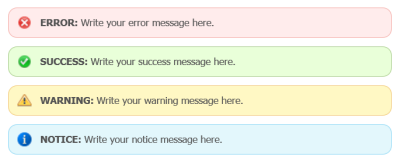
IN YOUR CSS
Code:
.alert-box {
  color:#555;
border-radius:10px;
font-family:Tahoma,Geneva,Arial,sans-serif;font-size:11px;
padding:10px 36px;
margin:10px;
}
.alert-box span {
font-weight:bold;
text-transform:uppercase;
}
.error {
background:#ffecec url('http://i.imgur.com/uI9zdLt.png') no-repeat 10px 50%;
border:1px solid #f5aca6;
}
.success {
background:#e9ffd9 url('http://i.imgur.com/Z2dChip.png') no-repeat 10px 50%;
border:1px solid #a6ca8a;
}
.warning {
background:#fff8c4 url('http://i.imgur.com/EfdEAUr.png') no-repeat 10px 50%;
border:1px solid #f2c779;
}
.notice {
background:#e3f7fc url('http://i.imgur.com/ZcZFYV7.png') no-repeat 10px 50%;
border:1px solid #8ed9f6;
}
HTML YOU NEED TO USE WHEN WANTING TO DISPLAY THE MESSAGE BOX
Code:
<div class="alert-box error"><span>error: </span>Write your error message here.</div>

<div class="alert-box success"><span>success: </span>Write your success message here.</div>

<div class="alert-box warning"><span>warning: </span>Write your warning message here.</div>

<div class="alert-box notice"><span>notice: </span>Write your notice message here.</div>
Download the CSS & Image Set (GUESTS CAN DOWNLOAD): Glittered Resources


