



Dear WJunction community,
After intensive development and testing, we are excited to officially launch Videro.im! Built by former streaming site owners who understand the daily pain points of publishers, Videro focuses on low latency, zero buffering, reliable payouts, and publisher-friendly tools (even for adult content uploaders).
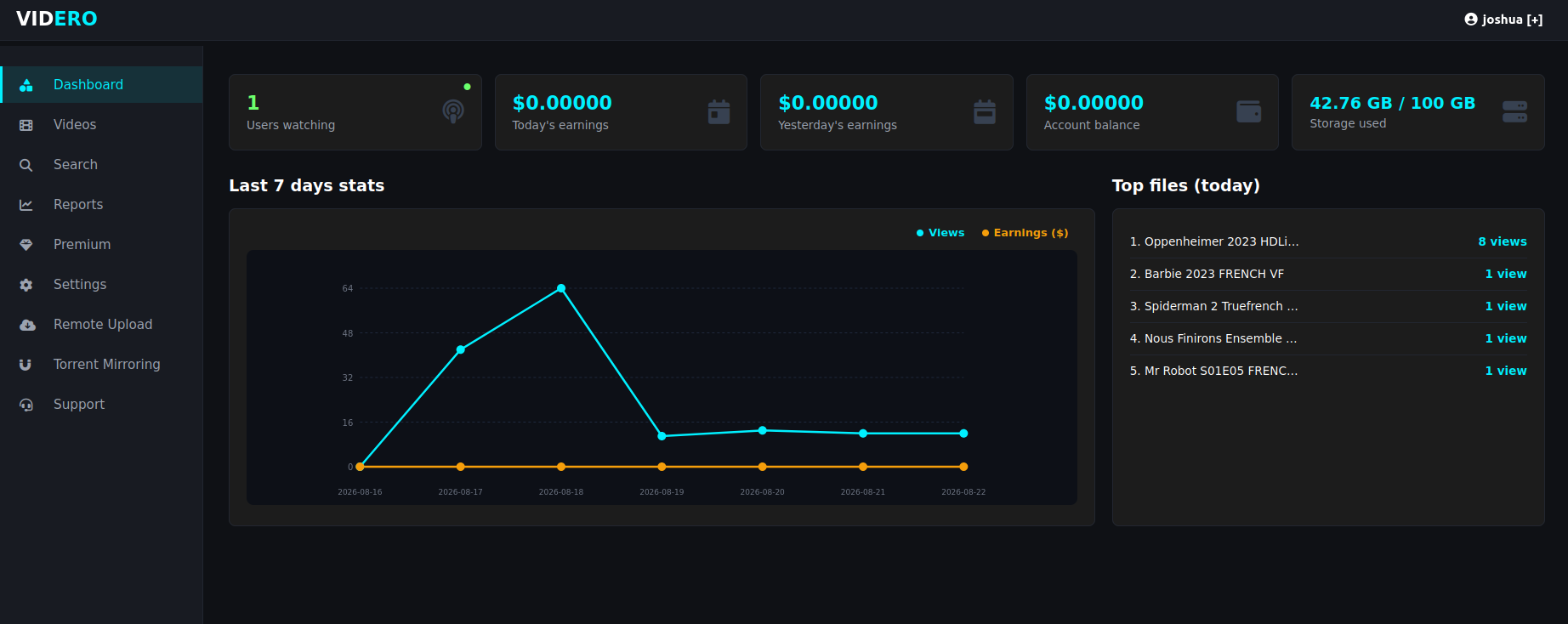
 Key Features & Highlights
 Affiliate Program & Payouts
We believe webmasters shouldn't wait weeks to get paid for their traffic.
 Developer API & Integrations
 Redundancy & Infrastructure
In the event of DNS blocks, backup domains are pre-configured to keep your embeds running continuously with minimal effort on your side.
 Frequently Asked Questions (FAQ)
Q: What is the file inactivity retention period?
A:
• Free users: Inactive files (0 views) are kept for 60 days before auto-cleanup.
• Premium users: Files are retained indefinitely as long as your subscription is active.
Q: What is the maximum file upload size?
A: You can upload files up to 1 GB per video (via Web Upload, Remote Upload, or Torrent Mirroring) in Free mode. Premium users can upload single files of several GB.
Q: What is the maximum storage allocation?
A: You can upload files up to 100 GB of content (via Web Upload, Remote Upload, or Torrent Mirroring) in Free mode. Premium users have no limits.
Q: Can I customize player settings?
A: Yes! From your dashboard, you can:
• Restrict video embeds to your specific domain names (Prevent iframe hotlinking).
• Hide/Show the direct download button for viewers.
• Toggle Anti-AdBlock enforcement.
• (Coming soon) Enable subtitle burning (SRT) directly onto encoded streams.
• (Coming soon) Player customization (colors, etc.) will be rolled up in the next update.
Q: How does Remote Upload & Torrent Mirroring work?
A: Remote upload works directly via HTTP/HTTPS links. Torrent ingestion is fully automated: paste the magnet link or torrent file, and encoding starts as soon as downloading completes.
Q: How are payouts processed?
A: Payouts are checked and processed daily with a low threshold of $10. We currently support BSC tokens (USDC / USDT / BNB) for fast and low-fees transactions.
 Support & Feedback
We are fully committed to providing top-tier customer support. No ticket or question will be left behind.
Feel free to sign up, test our remote upload and player speed, and leave your suggestions or feature requests directly in this thread!
 Website links
Website, dashboard: https://videro.im
Test video (embed): https://videro.my/e/ff0io5jwkgayvw7
Test video (direct link): https://videro.my/d/ff0io5jwkgayvw7
Terms: https://videro.im/terms
Copyright policy: https://videro.im/copyright
Tier rates (updated regularly): https://videro.im/earn
 Support
Support Ticket System in Dashboard / Thread Replies
Let's make video hosting great again, the gates are open!
After intensive development and testing, we are excited to officially launch Videro.im! Built by former streaming site owners who understand the daily pain points of publishers, Videro focuses on low latency, zero buffering, reliable payouts, and publisher-friendly tools (even for adult content uploaders).
Key Features & Highlights- Fast HLS Encoding: Dedicated hardware acceleration (iGPU) ensures your videos are processed within minutes (10-15 mins during high server loads) without queue bottlenecks.
- No-Buffering Playback: Optimized global delivery infrastructure to eliminate playback buffering for your end users.
- Balanced Monetization: No abusive 15-click ad loops. Average 3 to 5 clicks to play (2-3 pop-unders + push notifications), guaranteeing smooth UX while keeping CPMs profitable.
- Advanced DMCA Manager: Automated link regeneration system on the fly — keep your content indexed and accessible without losing traffic (you will be able to use the API to regenerate them soon).
- Direct Upload, Remote Upload & Torrent Mirroring: Seamless HTTP/HTTPS remote upload (compatible with major hosts like Voe, Vidzy, etc.) + direct torrent ingestion, or drag/drop your files anywhere. You can track the encoding progress either in the Remote Upload page or directly on the direct/embed link page.
- Global File Search & Mass Clone: Duplicate files easily and manage your library efficiently via dashboard or API.
- Anti-AdBlock Option: Toggleable feature to block aggressive AdBlock extensions and maximize your earnings.
- Adult Friendly: Consensual adult content is fully allowed.
Affiliate Program & PayoutsWe believe webmasters shouldn't wait weeks to get paid for their traffic.
- Minimum Payout: Only $10
- Payment Frequency: Daily payouts processed on the nail
- Payment Methods: Crypto (USDC / USDT / BNB on BSC)
- Tiered CPM: Standard rates based on Tier 1 / Tier 2 / Tier 3 traffic (check dashboard for full details). Tiers will be increased regularly, as we are starting low to build the user base.
Developer API & Integrations- Full REST API available out of the box for automated uploads, file listing, folder management, and stats tracking.
- A documentation page has been made to make it easy to handle and understand.
Redundancy & InfrastructureIn the event of DNS blocks, backup domains are pre-configured to keep your embeds running continuously with minimal effort on your side.
Frequently Asked Questions (FAQ)Q: What is the file inactivity retention period?
A:
• Free users: Inactive files (0 views) are kept for 60 days before auto-cleanup.
• Premium users: Files are retained indefinitely as long as your subscription is active.
Q: What is the maximum file upload size?
A: You can upload files up to 1 GB per video (via Web Upload, Remote Upload, or Torrent Mirroring) in Free mode. Premium users can upload single files of several GB.
Q: What is the maximum storage allocation?
A: You can upload files up to 100 GB of content (via Web Upload, Remote Upload, or Torrent Mirroring) in Free mode. Premium users have no limits.
Q: Can I customize player settings?
A: Yes! From your dashboard, you can:
• Restrict video embeds to your specific domain names (Prevent iframe hotlinking).
• Hide/Show the direct download button for viewers.
• Toggle Anti-AdBlock enforcement.
• (Coming soon) Enable subtitle burning (SRT) directly onto encoded streams.
• (Coming soon) Player customization (colors, etc.) will be rolled up in the next update.
Q: How does Remote Upload & Torrent Mirroring work?
A: Remote upload works directly via HTTP/HTTPS links. Torrent ingestion is fully automated: paste the magnet link or torrent file, and encoding starts as soon as downloading completes.
Q: How are payouts processed?
A: Payouts are checked and processed daily with a low threshold of $10. We currently support BSC tokens (USDC / USDT / BNB) for fast and low-fees transactions.
Support & FeedbackWe are fully committed to providing top-tier customer support. No ticket or question will be left behind.
Feel free to sign up, test our remote upload and player speed, and leave your suggestions or feature requests directly in this thread!
Website linksWebsite, dashboard: https://videro.im
Test video (embed): https://videro.my/e/ff0io5jwkgayvw7
Test video (direct link): https://videro.my/d/ff0io5jwkgayvw7
Terms: https://videro.im/terms
Copyright policy: https://videro.im/copyright
Tier rates (updated regularly): https://videro.im/earn
SupportSupport Ticket System in Dashboard / Thread Replies
Let's make video hosting great again, the gates are open!
Last edited:


