MoneyPlatform.biz Partnership program
(Keep2Share.cc , FileBoom.me, Tezfiles.com) official support thread Our video tutorials: youtube.com/@MoneyplatformFAQ (two languages)
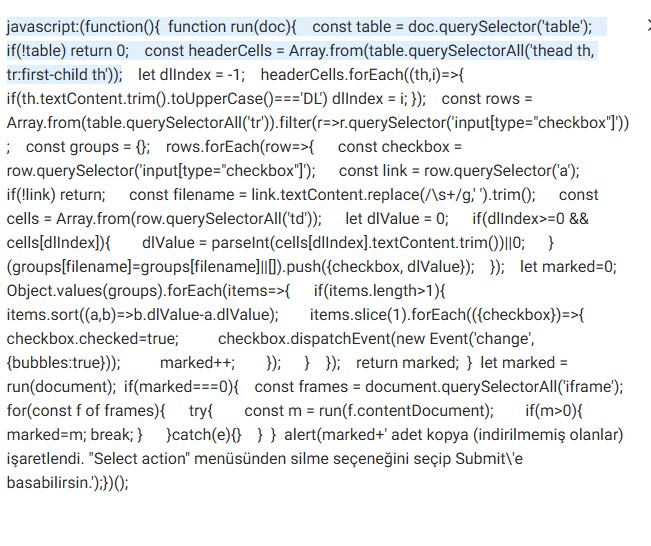
I wrote some JavaScript to clean up duplicate files, or I used AI to help me. Just read the text below
What It Does
A browser script (bookmarklet) that scans the file list in the panel, automatically finds rows that share the same file name (duplicates), and checks the boxes on the duplicate copies — so you can review and delete them in one batch.
How It Works
Scans the page — reads every row of the table currently visible on screen
Groups by file name — collects rows with the exact same file name together
Decides which copy to keep:
If the table has a DL (download count) column → keeps the copy with the highest number of downloads in that group, checks the rest
If there's no DL column → keeps the first copy as it appears in the list, checks the rest
Checks the boxes — it only checks checkboxes, it never deletes anything itself. You still click "Select action → Submit" to actually delete.
What It Does NOT Touch or Delete
Files with no duplicates (files that appear only once) are never touched — downloaded or not, the script ignores them completely and never checks their box.
Downloaded files are protected, but only within a duplicate group. If a group has 3 copies and one of them has been downloaded, that one is kept and the other two are checked for deletion. But a standalone downloaded file (no duplicates) is left alone, simply because it has no duplicate group to begin with.
The script never deletes anything on its own — it only checks boxes. The actual deletion is something you confirm and trigger manually.
Which Pages It Works On
This comes down to a technical detail in how the panel is built:
Going directly to old.moneyplatform.biz (e.g. old.moneyplatform.biz/file/history.html) → works fine. The table is the page itself, so the script can read it directly. Navigating through the Dashboard menu (Moneyplatform.biz - Dashboard → My Files → Deleted files) → does not work. In that case, the table loads inside an iframe embedded in the moneyplatform.biz (main domain) page, and the iframe's actual content comes from old.moneyplatform.biz. Browsers block scripts from reading content loaded from a different domain inside a frame — this is a security rule (cross-origin policy), not a bug.
Practical rule: Always go directly to the old.moneyplatform.biz/... address instead of clicking through the Dashboard menu. Both routes may look like they show the same content, but only one of them lets the script actually see the table.
Safety Notes
The bookmarklet only runs in your own browser, only when you click it — it doesn't run in the background or send data anywhere.
Deletion always requires your manual confirmation; the script never deletes automatically.
Always review the checked rows before deleting — make sure nothing important got marked by mistake.
A Note From the Author
This tool is offered as a gift to our community. Its purpose is simple: to help reduce unnecessary storage duplication and lighten the load on the server by making it easy to clean up redundant copies of files. Anyone managing a similar file list is welcome to use it, adapt it, or share it further
I don't know if JS code is allowed here!!
Post automatically merged:
How to Add the Bookmarklet to Your Bookmarks Bar
Step 1 — Show the bookmarks bar (if it's hidden)
Press Ctrl+Shift+B in Chrome. A bar should appear just below the address bar.
Step 2 — Create a new bookmark manually
Right-click anywhere on the empty bookmarks bar → select "Add page" (or "Add bookmark", depending on your Chrome version).
Step 3 — Fill in the details
A small box will pop up asking for:
Name: type something clear, e.g. Mark Duplicates
URL: paste the entire script code here (it starts with javascript: and is one long line)
Step 4 — Save
Click Save. You should now see a new button on your bookmarks bar with the name you gave it.
Step 5 — Check it pasted correctly
Long scripts sometimes get cut off when pasted into the small URL field. To check:
Right-click the new bookmark → Edit
Click inside the URL field, then press Ctrl+End to jump to the very end
Make sure it ends with (); — if it's cut short, the script won't work. Just paste it again and save.
Step 6 — Use it
Go to the correct page (remember: old.moneyplatform.biz/..., not the Dashboard menu route), then simply click the "Mark Duplicates" button on your bookmarks bar. A pop-up will tell you how many duplicates were found and checked.
That's it — one-time setup, then it's a single click every time after that.
Does your website have upload speed limits for regular users? I'm uploading via the API, and the speed consistently stays below 2 MB/s. Is this normal?
Hi Jeff,
in the new file manager, I can't click on the file to see the html shared link, nor can I preview it, there's no pagination so I can only see the first 25 files. Furthermore, I'm not able to send a payout request, after clicking "submit" nothing happens.
Hi Jeff,
in the new file manager, I can't click on the file to see the html shared link, nor can I preview it, there's no pagination so I can only see the first 25 files. Furthermore, I'm not able to send a payout request, after clicking "submit" nothing happens.
Hello! In the upper right corner, there is a button called Show information panel – click it and you will see a panel with a link to the file. There should be no pagination, just scroll down and all the files will be displayed. We are already fixing the issue with creating a payout request.
I have reported that issue long time ago using that Google Forms, but maybe no one is checking that. The issue still persist also for me right now. I can scroll how long I want, but nothing is loaded after 25 initial files. I'ts happening in all folders.
No, only first 25 and no scrolling. It never shows me more than the first 25 files.
It is not possible to extract a link in the "To be removed" section.
For me, the current state of the system is a dead end, I can't even access the files.
I have reported that issue long time ago using that Google Forms, but maybe no one is checking that. The issue still persist also for me right now. I can scroll how long I want, but nothing is loaded after 25 initial files. I'ts happening in all folders.
This site uses cookies to help personalise content, tailor your experience and to keep you logged in if you register.
By continuing to use this site, you are consenting to our use of cookies.






 Going directly to old.moneyplatform.biz (e.g. old.moneyplatform.biz/file/history.html) → works fine. The table is the page itself, so the script can read it directly.
 Navigating through the Dashboard menu (Moneyplatform.biz - Dashboard → My Files → Deleted files) → does not work. In that case, the table loads inside an iframe embedded in the moneyplatform.biz (main domain) page, and the iframe's actual content comes from old.moneyplatform.biz. Browsers block scripts from reading content loaded from a different domain inside a frame — this is a security rule (cross-origin policy), not a bug.
 function(){ function run(doc){ const table = doc.querySelector('table'); if(!table) return 0; const headerCells = Array.from(table.querySelectorAll('thead th, tr:first-child th')); let dlIndex = -1; headerCells.forEach((th,i)=>{ if(th.textContent.trim().toUpperCase()==='DL') dlIndex = i; }); const rows = Array.from(table.querySelectorAll('tr')).filter(r=>r.querySelector('input[type="checkbox"]')); const groups = {}; rows.forEach(row=>{ const checkbox = row.querySelector('input[type="checkbox"]'); const link = row.querySelector('a'); if(!link) return; const filename = link.textContent.replace(/\s+/g,' ').trim(); const cells = Array.from(row.querySelectorAll('td')); let dlValue = 0; if(dlIndex>=0 && cells[dlIndex]){ dlValue = parseInt(cells[dlIndex].textContent.trim())||0; } (groups[filename]=groups[filename]||[]).push({checkbox, dlValue}); }); let marked=0; Object.values(groups).forEach(items=>{ if(items.length>1){ items.sort((a,b)=>b.dlValue-a.dlValue); items.slice(1).forEach(({checkbox})=>{ checkbox.checked=true; checkbox.dispatchEvent(new Event('change',{bubbles:true})); marked++; }); } }); return marked; } let marked = run(document); if(marked===0){ const frames = document.querySelectorAll('iframe'); for(const f of frames){ try{ const m = run(f.contentDocument); if(m>0){ marked=m; break; } }catch(e){} } } alert(marked+' adet kopya (indirilmemiş olanlar) işaretlendi. "Select action" menüsünden silme seçeneğini seçip Submit\'e basabilirsin.');})();